Effects, transitions, animation, flashes, and presets
A property value, a processing operation and a timeline relationship solve different problems. Choose the one that owns the change you want to make.
| Feature | What it changes | Continue with |
|---|---|---|
| Animation | A property over layer-local time | Keyframes |
| Effect | The appearance of a layer or composed output | Attach an effect |
| Transition | Presentation of two sibling layers over an interval | Transition comparisons |
| Flash | A short root-owned color overlay | Flashes |
| Preset | Reusable cinematic intent on one eligible image layer | Preset contracts |
Animation can drive an effect parameter: a blur still runs in the same processing stage as its radius changes. A transition owns presentation channels on its outgoing and incoming endpoints, driven by normalized progress. Manually keyframing a layer does not create that two-layer relationship.
Processing stages

This is a schematic of ownership and order, not a rendered image. Read downward: a layer's masks see its effected presentation, then a track matte supplies coverage, then opacity and blend place it into its parent. A group first composes its children; its placed result then passes through the same layer pipeline. Project post-effects process the complete root result.
Effects retain attachment order within their stage. Motion Tile is the only pre-transform effect, so it fills a virtual source region before moving or rotating that source. Other effects process the transformed image. A larger Motion Tile region does not make the canvas larger.
A useful consequence: layer blur does not blur the background behind a title. To blur the final title and background together, use a project post-effect. To blur only a composed card, apply the effect to that card's group layer.
Order changes the result
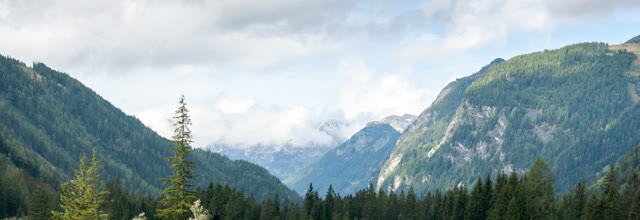
The two actual CPU renders below use the same photograph, palette and settings. Only attachment order changes.
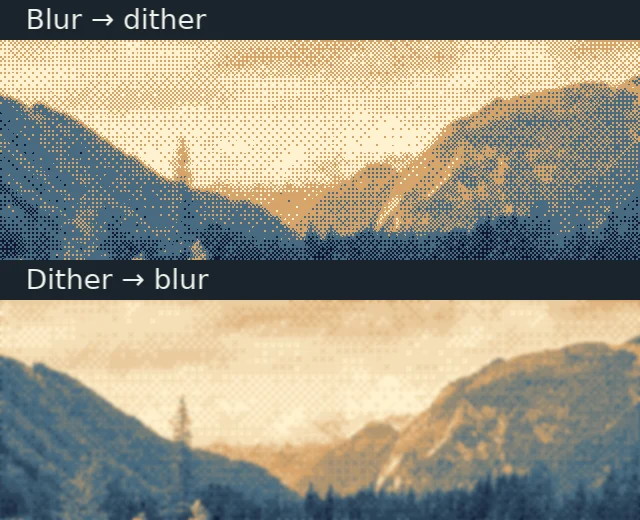
The source, radius, palette and dither scale stay fixed. Only attachment order
changes. Complete example: keep
landscape.jpg beside it and run
uv run python effects_catalog.py --effect order --still to replace effect-order.webp.
The catalog compares individual effects.
Ownership and clocks
Effects attach by copy. Keep layer.effects.add(...)'s returned handle to edit
that placement. An untimed child effect uses its child layer's local time; an effect on
the parent group uses that group's layer-local time. Global effect tracks use
the project span. A CameraShake with a delayed active_interval uses time since
that effect interval began for its parameter tracks. Periodic CRT/palette colors loop their procedural component;
they do not loop source video or audio.
Transitions belong to the immediate composition shared by their two endpoints. A nested composition can own transitions between its children; the parent can also transition that entire composition layer. The placement's start and duration use the owning composition's clock, while definition channels use progress 0..1. See timeline and time and the transition guide for the relationship between placement, overlap and progress.
Interpolation
The authoritative animation explanation covers base values, destination-keyframe easing, holds, cubic Bézier curves and overshoot. Layer tracks use layer-local seconds; timed effects use effect-local seconds; transition channels use normalized progress. The first keyframe takes effect at its time without interpolating from the base value. Before it the base value applies; after the last keyframe its value holds. Keep resulting values within the parameter's supported range.
Find exact scope, stage, alpha and timing rules in effect contracts, precise controls in effect parameters, and canonical JSON curves in animation reference, and implementation mathematics in effect algorithms.